RubyでEvernoteのタグとかノート属性の操作してみる
前回に引き続き、EDAMTest.rbを変更してノートの属性などを変更してみます。
今回の目標はこの辺。
- 保存するノートやタグの設定をする
- ファイルの情報を基にノートの属性を設定する
今回のサンプル画像に使うために川崎駅前で時計を撮ってきましたw
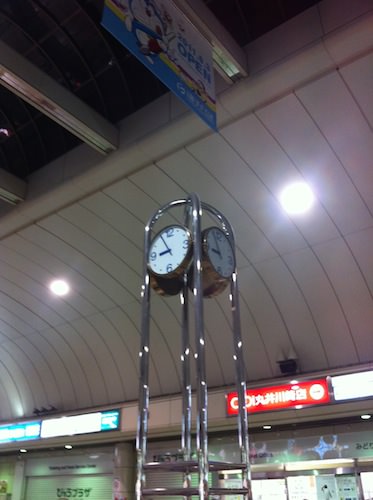
普段、カメラの位置情報は切っているので、手元にGPS情報ありの画像が無く…
せっかくなのでその辺も付与したかったので( ´ ▽ ` )ノ
保存するノートやタグの設定をする
と、その前にタグの一覧を取得出来るようにしたいので、notebooksの取得あたりを参考にタグの一覧を取得するように変更。
ついでにnotebookの方も一緒に、guidを表示するように。
notebooks = noteStore.listNotebooks(authToken)
puts "Found #{notebooks.size} notebooks:"
defaultNotebook = notebooks[0]
notebooks.each { |notebook|
  puts "  * #{notebook.name} : #{notebook.guid}"
  if (notebook.defaultNotebook)
    defaultNotebook = notebook
  end
}
defaultNotebook辺りの情報を取得しているのでその辺りは不要。
とにかくeachでループして情報を表示するだけに。
tags = noteStore.listTags(authToken)
puts "Found #{tags.size} tags"
tags.each { |tag|
  puts "  * #{tag.name} : #{tag.guid}"
}
これで取得出来た guid を作成するノートの note.notebookGuid とか note.tagGuids に設定すれば、設定されるはず…
なのだけど、とりあえず動かしてみないとわからないので、ひとまずこの状態で動かしてみる事に。
表示する物が無いとつまらないので、Sandbox環境にはWebから testnotebook と testtag1/testtag2 を作成しておいた。
$ ruby EDAMTest.rb ksworks ******** -
Unable to load thrift_native extension. Defaulting to pure Ruby libraries.
warning: peer certificate won't be verified in this SSL session
Is my EDAM protocol version up to date?  true
warning: peer certificate won't be verified in this SSL session
Authentication was successful for ksworks
Authentication token =
**********************************************************************************************
warning: peer certificate won't be verified in this SSL session
Found 2 notebooks:
  * ksworks のノートブック : 92e8391f-ebcb-4495-b53c-4b5a80a62deb
  * testnotebook : 4441480b-8325-4abe-b3e5-98cc862dad7c

Creating a new note in the default notebook: ksworks のノートブック

warning: peer certificate won't be verified in this SSL session
Found 2 tags:
  * testtag1 : c564af37-c6c8-4c77-b57d-35a4819f9e10
  * testtag2 : 359dd51c-935c-4edc-9db5-41b57eab4e9f
EDAMTest.rb:133:in `initialize': No such file or directory - - (Errno::ENOENT)
    from EDAMTest.rb:133:in `open'
    from EDAMTest.rb:133
ファイル名の指定をあり得ない(“-“という)指定にしているので、EDAMTest.rb:133 でエラーになって終了というところは意図通りw
notebooks = noteStore.listNotebooks(authToken)
puts "Found #{notebooks.size} notebooks:"
defaultNotebook = notebooks[0]
selectedNotebook = nil
notebooks.each { |notebook|
  puts "  * #{notebook.name} : #{notebook.guid}"
  if (notebook.defaultNotebook)
    defaultNotebook = notebook
  end
  if (notebook.name == "testnotebook")
    selectedNotebook = notebook
  end
}

puts
if selectedNotebook.nil? then
  puts "Creating a new note in the default notebook: #{defaultNotebook.name}"
else
  puts "Creating a new note in the selected notebook: #{selectedNotebook.name}"
end
puts
設定出来るところまで確認したいだけなので、notebookを選ぶ機能とか省略!
決めうちで testnotebook の場合を選択するようにw
tags = noteStore.listTags(authToken)
puts "Found #{tags.size} tags:"
selectedTag = nil
tags.each { |tag|
  puts "  * #{tag.name} : #{tag.guid}"
  if (tag.name == "testtag2")
    selectedTag = tag
  end
}

if !selectedTag.nil? then
  puts
  puts "Createing a new note with the selected tag: #{selectedTag.name}"
  puts
end
タグも同様に testtag2 を決めうちでw
if !selectedNotebook.nil? then
  note.notebookGuid = selectedNotebook.guid
end
if !selectedTag.nil? then
  note.tagGuids = [ selectedTag.guid ]
end
最後に note の設定するときに、それぞれ notebookGuid / tagGuids を設定するようにすれば大丈夫なはず。
ここでタグの設定は複数指定可能なので配列になるので微妙に設定方法が違うのに注意。
とは言え、selectedTagは一つだけなのでここでは簡略化して一個だけ設定(^_^;)
ファイルの情報を基にノートの属性を設定する
次に、ファイルの情報を基にノートの属性を設定するわけですが、どこまでやろうかなと…
$ stat -x IMG_0074.jpg
  File: "IMG_0074.jpg"
  Size: 58172        FileType: Regular File
  Mode: (0644/-rw-r--r--)         Uid: (  501/      ks)  Gid: (   20/   staff)
Device: 14,1   Inode: 11049980    Links: 1
Access: Sat Nov  5 00:12:16 2011
Modify: Fri Nov  4 23:38:11 2011
Change: Fri Nov  4 23:38:11 2011
ひとまずは簡単にTerminal.appでstatしてとれる情報を基にします。
ざっと表示してみたところで、使えそうなのは Modify/Change の時刻くらいかな(^_^;)
これをそのまま note.created/note.updated に設定することに。
s = File.stat(filename)
note.created = s.ctime.to_i * 1000
note.updated = s.mtime.to_i * 1000
ctime(Change)/mtime(Modify)あたりは所謂UNIXTIMEなのだけど、noteに設定するのはミリ秒単にになるみたいなので 1000倍する必要があることに注意(^_^;)
$ ruby EDAMTest.rb ksworks ******** IMG_0074.jpg
Unable to load thrift_native extension. Defaulting to pure Ruby libraries.
warning: peer certificate won't be verified in this SSL session
Is my EDAM protocol version up to date?  true
warning: peer certificate won't be verified in this SSL session
Authentication was successful for ksworks
Authentication token = **********************************************************************************************
warning: peer certificate won't be verified in this SSL session
Found 2 notebooks:
  * ksworks のノートブック : 92e8391f-ebcb-4495-b53c-4b5a80a62deb
  * testnotebook : 4441480b-8325-4abe-b3e5-98cc862dad7c

Creating a new note in the selected notebook: testnotebook

warning: peer certificate won't be verified in this SSL session
Found 2 tags:
  * testtag1 : c564af37-c6c8-4c77-b57d-35a4819f9e10
  * testtag2 : 359dd51c-935c-4edc-9db5-41b57eab4e9f

Createing a new note with the selected tag: testtag2

warning: peer certificate won't be verified in this SSL session
Successfully created a new note with GUID: a737b9ba-6057-4d68-9277-71c795c09e1f
これで無事アップロードできたので、Webで実際のノートの中身を再確認!
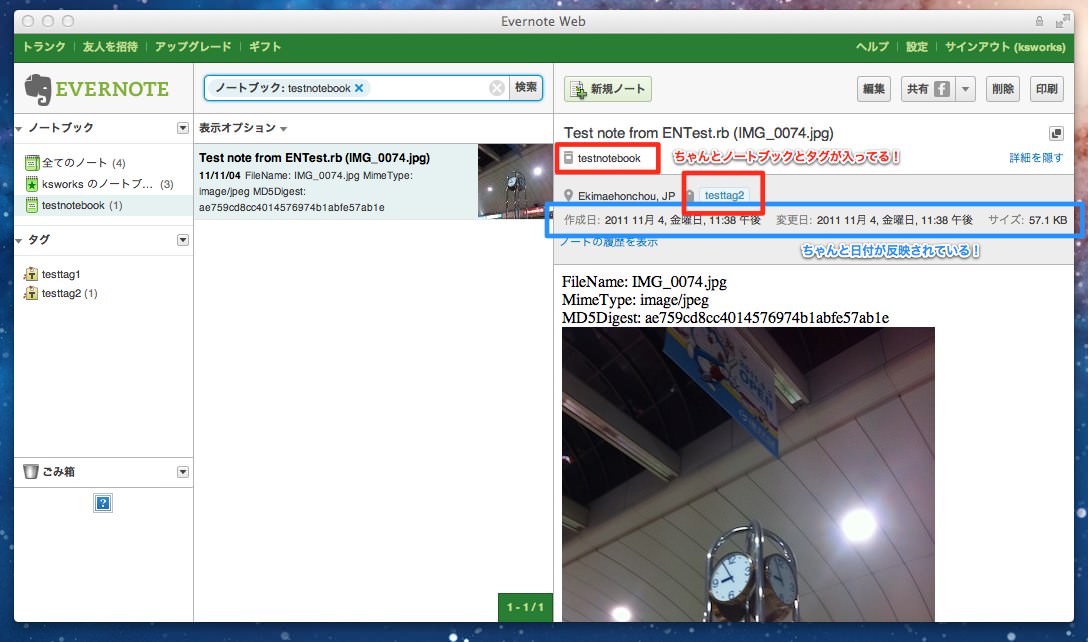
ノートの中身は前回と全然変わってないけど、ちゃんとノートブック・タグ・日付あたりが反映されてる( ´ ▽ ` )g
ということで、ここまでの変更一式Diffはこちら。
--- EDAMTest.rb.orig2   2011-11-04 23:48:15.000000000 +0900
+++ EDAMTest.rb 2011-11-05 00:31:51.000000000 +0900
@@ -112,17 +112,41 @@
 notebooks = noteStore.listNotebooks(authToken)
 puts "Found #{notebooks.size} notebooks:"
 defaultNotebook = notebooks[0]
+selectedNotebook = nil
 notebooks.each { |notebook|
-  puts "  * #{notebook.name}"
+  puts "  * #{notebook.name} : #{notebook.guid}"
   if (notebook.defaultNotebook)
     defaultNotebook = notebook
   end
+  if (notebook.name == "testnotebook")
+    selectedNotebook = notebook
+  end
 }

 puts
-puts "Creating a new note in the default notebook: #{defaultNotebook.name}"
+if selectedNotebook.nil? then
+  puts "Creating a new note in the default notebook: #{defaultNotebook.name}"
+else
+  puts "Creating a new note in the selected notebook: #{selectedNotebook.name}"
+end
 puts

+tags = noteStore.listTags(authToken)
+puts "Found #{tags.size} tags:"
+selectedTag = nil
+tags.each { |tag|
+  puts "  * #{tag.name} : #{tag.guid}"
+  if (tag.name == "testtag2")
+    selectedTag = tag
+  end
+}
+
+if !selectedTag.nil? then
+  puts
+  puts "Createing a new note with the selected tag: #{selectedTag.name}"
+  puts
+end
+
 #filename = "enlogo.png"
 image = File.open(filename, "rb") { |io| io.read }
 hashFunc = Digest::MD5.new
@@ -152,6 +176,16 @@
   '<en-media type="' + mime_type +'" hash="' + hashHex + '"/>' +
   '</en-note>'
 note.resources = [ resource ]
+if !selectedNotebook.nil? then
+  note.notebookGuid = selectedNotebook.guid
+end
+if !selectedTag.nil? then
+  note.tagGuids = [ selectedTag.guid ]
+end
+
+s = File.stat(filename)
+note.created = s.ctime.to_i * 1000
+note.updated = s.mtime.to_i * 1000

 createdNote = noteStore.createNote(authToken, note)
せっかくGPS情報付きの写真撮ってきたのにここまで!?
ということで、次回はJPEG画像からその辺りの情報を取得して設定するところをやろうと思っています( ´ ▽ ` )ノ
- スポンサードリンク -